SMS delivery statuses and error codes explained
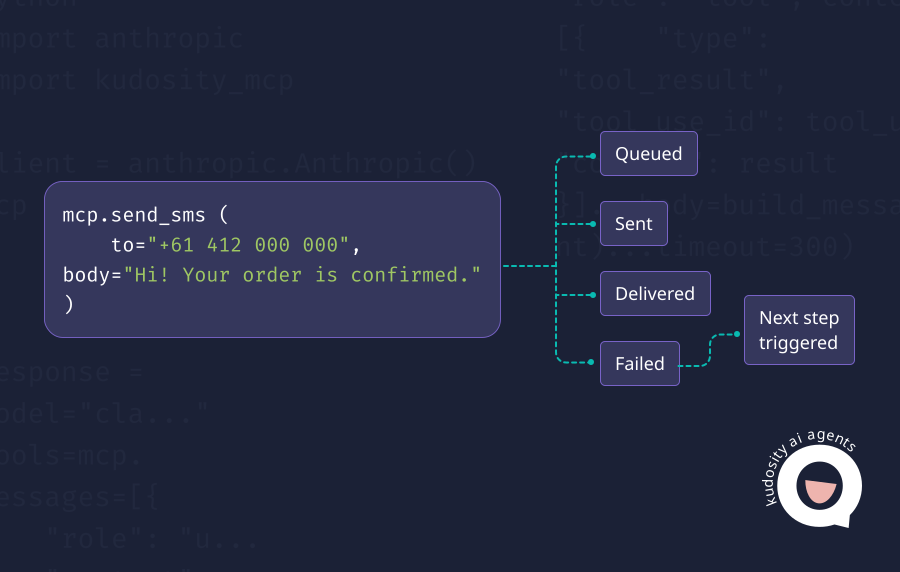
AI-powered SMS workflows need clear feedback from the messaging layer. If an AI agent sends a customer message, the workflow needs to know what happened next. Was the message queued? Sent? Delivered? Rejected? Did the customer reply? Did the send fail because the number was invalid, the recipient opted out, or the carrier could not complete delivery?
SMS delivery statuses and error codes give AI workflows the signals they need to make the next decision. Without them, the agent can only assume the message worked. That is not enough for customer communication, especially when the message affects appointments, payments, deliveries, security alerts or support follow-up.
What is an SMS delivery status?
An SMS delivery status shows where a message is in the sending lifecycle.
It is the operational state of the message as it moves from your system to the SMS provider, through the carrier network, and toward the recipient’s handset. Depending on the provider and carrier, the status may show whether the message is queued, sent, delivered, failed, undelivered, expired or rejected.
Kudosity’s developer documentation explains that delivery receipts are carrier notifications relating to the success or failure of an attempted SMS delivery, and its callback data can include fields such as message ID, recipient mobile, timestamp and status.
The detail matters because delivery reporting is not always identical across providers or carriers. Some reports confirm handset-level delivery, while others may only confirm carrier acknowledgement. Kudosity’s reporting documentation notes that delivery reports may be marked using either a DLR, which is a handset-level report, or an ACK, which confirms the carrier received the request.
For AI workflows, the status should not just sit in a dashboard. It should feed back into the customer record or workflow so the agent can act on it.
Common SMS delivery statuses
Status names vary by provider, but most SMS platforms use a similar lifecycle. Twilio, for example, lists message statuses including queued, sending, sent, failed, delivered and undelivered.
| Status | Meaning | Recommended action |
|---|---|---|
| Queued | The message has been accepted by the platform and is waiting to be processed or sent. | Wait for the next status update. Escalate only if the message stays queued longer than expected. |
| Sent | The message has been submitted for delivery, often to the carrier or next routing layer. | Continue monitoring for delivered, failed or undelivered status. |
| Delivered | The message has been confirmed as delivered where delivery reporting is available. | Mark the notification as complete or trigger the next workflow step. |
| Failed | The message could not be processed or sent successfully. | Review the error code, suppress if permanent, retry if temporary or escalate if needed. |
| Undelivered | The message was sent but could not be delivered to the recipient. | Check number quality, carrier response, recipient availability and whether another channel should be used. |
| Expired | The message stayed pending or queued beyond the allowed delivery window. | Do not keep retrying blindly. Review urgency, timing and whether the message is still relevant. |
| Rejected | The message was refused before normal delivery, often due to policy, sender, content or routing rules. | Review sender ID, content, compliance controls and provider error details before retrying. |
A “delivered” status is useful, but it should still be interpreted correctly. It usually confirms delivery based on the available carrier or handset reporting. It does not prove that the customer read, understood or acted on the message.
Common SMS error reasons
Error codes explain why a message did not complete as expected.
Different providers use different code structures, so developers should map provider-specific codes into practical workflow categories. The goal is not just to display the error. It is to decide what the system should do next.
Invalid number
The recipient number is not valid, incorrectly formatted or not reachable as a mobile number.
The workflow should suppress or flag the contact, then request correction through another channel if the message is important.
Opted-out recipient
The recipient has previously opted out or replied with a stop keyword.
The workflow should suppress the contact immediately for relevant message types. Twilio’s documentation notes that sending to a recipient who has previously replied with keywords such as STOP or UNSUBSCRIBE can trigger blocked sender rules.
Carrier issue
The message was accepted but could not be completed due to a temporary carrier, network or handset issue.
The workflow can retry if the message is still useful, but it should apply limits so the agent does not create repeated failed attempts.
Blocked route
The route may not be available, allowed or suitable for the destination or sender setup.
The workflow should escalate to technical review rather than continuing to retry the same path.
Content issue
The message content may have been filtered or rejected. This can happen when content looks suspicious, contains restricted language or fails provider or carrier checks.
The workflow should pause the send, flag the template and require human review before retrying.
Sender ID issue
The sender may not be registered, approved or valid for the market being messaged.
This is especially important for Australian branded SMS, where sender identity and compliance expectations should be reviewed before launch.
Rate limit issue
The workflow is sending too many messages too quickly, or the provider has applied a throughput limit.
The workflow should back off, queue messages or move traffic through an approved higher-capacity path.
Expired message
The message remained pending too long and is no longer being attempted.
Kudosity’s SMS API documentation references message expiry settings and notes that messages remaining in a pending state can be expired automatically after a defined window.
How AI workflows should handle failures
AI workflows should not treat every failed SMS the same way.
Some errors are permanent. Some are temporary. Some create compliance risk. Some need human review. A safe workflow maps each failure type to a specific response.
| Failure type | What it usually means | Recommended workflow response |
|---|---|---|
| Invalid number | The mobile number is malformed, inactive or not reachable. | Stop retrying, mark the number as invalid and create a data correction task. |
| Temporary carrier issue | The carrier or handset may be temporarily unavailable. | Retry within defined limits, then escalate or try another approved channel. |
| Opt-out | The customer has withdrawn consent or used an unsubscribe path. | Suppress future relevant messages immediately and log the opt-out. |
| Content rejected | The message may have breached content, filtering or policy rules. | Pause the template, route to human review and do not let the agent rewrite unchecked variants. |
| High failure spike | Many messages are failing in a short period. | Stop or throttle the workflow, alert operations and investigate routing, template, sender ID or provider issues. |
This is where AI workflow design matters. An agent should not be allowed to keep rewriting and resending messages until something works. It needs failure rules, retry limits, approved templates and escalation paths.
For Australian commercial messaging, opt-outs need particular care. ACMA states that commercial electronic messages must have consent, identify the sender and include a way to unsubscribe.
What to log
Every AI-powered SMS workflow should leave a clear record.
At minimum, log:
Message ID
Recipient
Sender
Status
Error code
Timestamp
Workflow ID
Customer or account ID
AI agent action
Template used
Retry status
Opt-out status
Final outcome
Kudosity’s AI agent documentation recommends using a message reference to correlate delivery webhooks back to a record in your system. That is the right operating model. Each SMS should be traceable from the original workflow event through to the final result.
For example, if an AI agent sends a payment reminder, the business should be able to see:
Why the message was triggered
Which template was used
Whether the message was delivered
Whether the customer replied
Whether the reply changed the workflow
Whether a person reviewed or took over
Whether the case was resolved
This turns SMS from a disconnected notification into an accountable customer workflow.
How delivery tracking supports AI-powered SMS workflows
A practical AI SMS workflow might look like this:

Customer event
AI agent decision
SMS sent
Delivery status received
Error or reply handled
Next action triggered
The delivery status is the point where the workflow becomes informed.
If the message is delivered, the agent may wait for a reply or move the customer to the next stage. If the message fails, the workflow can check the error code and decide whether to retry, suppress, escalate or switch channels. If the customer replies, the agent can classify the intent and trigger the next action.
That feedback loop is what makes AI-powered messaging useful. The agent is not just sending. It is responding to evidence from the messaging layer.
Kudosity’s webhook documentation supports this type of loop by notifying applications when events happen, including SMS delivery and incoming messages. It also includes reply callback fields such as the message ID, sender mobile, response text and opt-out flag.
Where Kudosity fits
Kudosity supports SMS delivery tracking, inbound SMS, webhook events and AI agent messaging workflows through its developer tools.
For teams building AI-powered SMS workflows, that means delivery, reply and failure events can feed back into the systems that need them. A message can be sent, tracked, matched to a workflow, reviewed by the agent and escalated where needed.
That matters for Australian businesses using SMS for appointment reminders, order updates, payment prompts, security alerts, customer support and AI follow-up. The best SMS API is not only the one that sends quickly. It is the one that helps teams understand what happened next.
FAQs
SMS delivered usually means the message has been confirmed as delivered where the carrier or provider has returned a delivery report. It does not necessarily mean the customer read or acted on the message.
An SMS can fail because the number is invalid, the recipient has opted out, the carrier could not complete delivery, the route was blocked, the content was rejected, the sender ID was not valid, rate limits were reached or the message expired.
Failed usually means the message could not be processed or sent successfully. Undelivered usually means the message was sent into the delivery path but could not reach the recipient. Exact meanings vary by provider, so check the provider’s status and error code documentation.
Track failed SMS messages through delivery reports, webhook events, error codes and message logs. The workflow should store the message ID, recipient, status, error code, timestamp, retry history and final outcome.
AI workflows should map each error to a controlled response. Invalid numbers should be suppressed or corrected. Temporary carrier issues can be retried within limits. Opt-outs must be respected immediately. Content or sender ID issues should be routed to human review before another send.
Get ready for Australia’s SMS Sender ID Registry
From July 2026, Sender ID registration will be required. ACMA’s final steps are still in progress, but Kudosity will keep you informed and help you be ready when registration opens.
:quality(80))
:quality(80))
:quality(80))
:quality(80))