
A practical guide to sending SMS from HubSpot with Kudosity
Your customer data might live in HubSpot. That does not mean every customer interaction should happen over email.
Adding SMS to HubSpot can help sales, operations and customer experience teams automate time-sensitive communication, respond to customer activity and build messaging into the workflows they already use.
When does it make sense to add SMS to HubSpot?
SMS is particularly useful for businesses that already rely on HubSpot to manage customer relationships but need a more immediate channel for operational or customer communication.
For mid-market organisations, the opportunity often extends beyond sending the occasional text. SMS can become part of automated workflows that connect customer data, operational events and communication across the business.
It can be particularly relevant for:

SaaS and technology businesses
Use SMS to support customer onboarding, product notifications, account communication and time-sensitive service updates.
Logistics businesses
Keep customers informed when an operational event requires their attention, from service updates to reminders and other time-sensitive communication.
Utilities
Add SMS to customer communication workflows where reach and timing matter, particularly for service-related updates and operational messaging.
Financial services
Use SMS within customer journeys that require timely communication, while accounting for the security, compliance and governance requirements that come with regulated industries.
Growing mid-market businesses
For organisations with 100 to 1,000 employees, messaging requirements can become more complex as customer volumes, teams and systems grow.
Connecting SMS with HubSpot can help reduce manual processes without introducing another disconnected communication workflow.
Use Cases:
How can businesses use SMS with HubSpot?
The right use case depends on why the customer needs to hear from you and what should happen before or after the message.
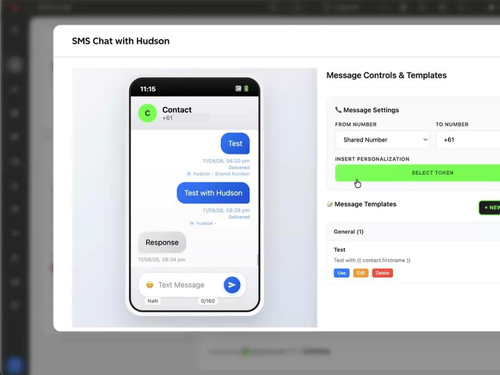
Follow up with leads while intent is high
Speed matters when someone requests a demonstration, submits an enquiry or reaches a high-intent stage in HubSpot. An automated SMS can acknowledge the enquiry, provide the next step or create another opportunity for the prospect to respond while the interaction is still fresh.
The workflow does not need to stop at sending a message. A well-designed process can use CRM data to determine which leads qualify for SMS, route different audiences into appropriate follow-up paths and define what should happen when the customer responds or the message cannot be delivered.
For sales teams handling growing lead volumes, this reduces reliance on representatives manually identifying every follow-up opportunity. For technical teams, the underlying messaging capability also needs to cope with demand without creating another fragile process that requires constant intervention.
Example: A prospect submits a high-intent form in HubSpot. Their lifecycle stage and consent status are checked before an SMS confirms the enquiry and sets expectations for the next step. The sales team can then continue the conversation with the CRM context already available.
Automate customer reminders
Reminders are well suited to automation because the event and desired customer action are usually known in advance.
An upcoming appointment, renewal, payment date or required customer action can trigger an SMS at a defined point in a HubSpot workflow. This can reduce repetitive work while giving customers information when it is most useful to them.
The more valuable opportunity is to design the workflow around exceptions as well as successful sends. What happens if customer data is incomplete? Should another channel be used if a message fails? Does the workflow need to stop once the customer takes the required action?
For businesses operating at higher volumes, these details determine whether automation genuinely removes work or simply creates another process for teams to monitor manually.
Example: An upcoming appointment enters a reminder workflow. Eligible customers receive an SMS at the appropriate interval, while records that do not meet the required conditions follow a different path rather than generating an unnecessary message.
Send operational updates
SMS can be particularly valuable when the customer needs to know something now, rather than the next time they check their inbox.
Logistics providers might need to communicate a change affecting a delivery
Utilities may need to provide service information.
SaaS businesses may have important account or product updates
Financial services organisations may need to prompt customers to take a time-sensitive action.
In these scenarios, HubSpot may be only one part of the workflow. The event that creates the message could originate in a product, billing, logistics or operational system before customer information or workflow logic is applied elsewhere.
That makes integration architecture important. As operational messaging becomes more business-critical, organisations need to consider API performance, throughput, delivery visibility and how messaging behaves during unexpected demand or seasonal peaks. The goal is not simply to automate the send. It is to create a dependable path between a business event and the customer who needs to know about it.
Example: A service event occurs in an operational system. That event is connected with the relevant customer context and initiates an SMS update, reducing the need for an operations team to identify affected customers and contact them individually.
Support customer onboarding
Customer onboarding rarely happens in a single channel. It can involve emails, product activity, calls, documentation and actions the customer needs to complete.
SMS can support that journey at the points where a direct prompt is useful. Rather than duplicating every email as a text message, businesses can identify the moments where a customer's progress has stalled or where an important next step warrants a more immediate touchpoint.
HubSpot data can provide the context for those decisions. Lifecycle stage, completed activities and other available customer information can help determine whether someone should enter an SMS workflow and what should happen afterwards.
For SaaS and technology businesses, this can also connect CRM communication with product-led processes. Where customer activity sits outside HubSpot, APIs and integrations can bring those events into the wider workflow so communication reflects what the customer has actually done.
Example: A new customer enters an onboarding journey but has not completed an important next step within the expected timeframe. Rather than sending another generic communication to every new customer, the workflow can identify the relevant audience and use SMS as a targeted prompt.
Re-engage customers and prospects
Re-engagement works best when there is a meaningful reason to contact someone, not simply because they have been inactive for an arbitrary period.
HubSpot can help teams identify audiences using the customer information available to them, such as lifecycle stage, previous interactions or campaign activity. SMS can then complement email, sales outreach and other channels where a direct message is appropriate.
Segmentation becomes increasingly important as databases grow. A high-volume re-engagement campaign should account for eligibility, consent and customer preferences before messages are triggered. Teams also need visibility into delivery and response outcomes so they can understand whether the workflow is working rather than judging performance solely by the number of messages sent.
This is especially important during seasonal campaigns, when messaging volumes can increase sharply.
The workflow and the infrastructure behind it both need to accommodate peak demand without sacrificing the controls applied during business-as-usual communication.
Example: A defined group of previously engaged prospects has stopped progressing through the sales journey. Eligible contacts enter a re-engagement workflow that uses SMS selectively alongside existing HubSpot channels rather than sending the same message to the entire database.
Connect SMS with wider business processes
For mid-market organisations, customer communication rarely begins and ends in the CRM.
A SaaS platform may hold product activity in its own application.
A logistics company may rely on transport or fulfilment systems.
A utility may generate service events elsewhere.
A financial services business may need information to move between several controlled systems before customer communication can occur.
An API-driven messaging approach allows SMS to participate in those broader processes while HubSpot continues to provide CRM context where relevant. A workflow might begin outside HubSpot, use customer information to determine the appropriate communication and then pass delivery or interaction data into another system for reporting or follow-up.
This is where the requirements move beyond a basic CRM plug-in. Technical teams need to consider API documentation, throughput, latency, authentication, error handling and reporting across systems. Operations and customer experience teams need confidence that automation will continue to work as message volumes and use cases grow.
Designing for those requirements early can prevent teams from building isolated SMS workflows that need to be replaced once messaging becomes more operationally important.
Example: A customer action occurs inside a SaaS product. That event triggers a process involving customer data, an SMS communication and a subsequent CRM action, with each system performing the role it is best suited to rather than forcing the entire process into HubSpot.
Can you automate SMS with HubSpot?
Yes, depending on your HubSpot plan, SMS integration and workflow configuration.
The more useful question is what should trigger the SMS?
Start with a customer or operational event rather than the channel itself. This could include a lead reaching a particular stage, an upcoming appointment, a customer action or another event captured by your connected systems.
From there, define:
Trigger:
What needs to happen?Audience:
Who should receive the message?Message:
What does that person need to know or do?Next step:
What should happen after the SMS?Exception:
What happens if the message cannot be delivered or the customer should not be contacted?
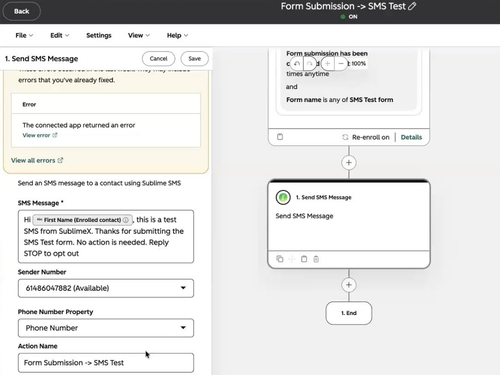
Thinking through the complete process helps prevent automation from becoming a collection of disconnected sends.
Five questions to ask before adding SMS to HubSpot
Before choosing an integration, map the business process you are trying to improve:
What event should result in an SMS?
Start with the customer or operational event rather than simply deciding you want to send more SMS.Does HubSpot contain the data the workflow needs?
If the information lives elsewhere, determine how those systems will connect before designing the automation.What volume do you expect?
Consider normal messaging volumes as well as campaign peaks, seasonal demand and future growth.What happens when delivery fails?
Decide whether the workflow should retry, alert someone, use another channel or require manual intervention.What compliance requirements apply?
Account for consent, identification, opt-outs, data handling and any requirements specific to your industry or destination markets.
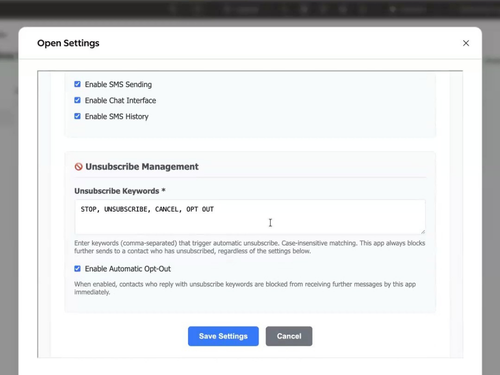
Ready to put SMS to work in HubSpot?
Turn your HubSpot workflows into timely customer conversations. Explore the SublimeX integration, powered by Kudosity, and see how SMS can support your sales, service and operational communication.
FAQs
HubSpot can be connected with SMS providers and integrations to incorporate SMS into customer workflows. The functionality available depends on the integration, HubSpot plan and messaging platform you use.
Common use cases include lead follow-up, customer reminders, onboarding, operational updates and re-engagement. SMS is generally most useful when the communication is timely, relevant and benefits from a direct customer touchpoint.
Yes, where your HubSpot plan and SMS integration support the required workflow functionality. The appropriate trigger could be a change in CRM data, customer activity or another event available to the workflow.
Usually, no. SMS and email serve different purposes. SMS can complement email for communications where immediacy and visibility are important, while email may be better suited to longer or less time-sensitive information.
Yes, depending on your integration architecture. Businesses with more complex requirements can use APIs and integrations to connect messaging with CRM, product and operational systems rather than limiting SMS to isolated HubSpot workflows.
Consider API capability, documentation, reliability, messaging throughput, reporting, security, compliance and access to support. The relative importance of each will depend on your messaging volume and how critical SMS is to your customer and operational processes.
The HubSpot integration is built by SublimeX and powered by Kudosity. SublimeX connects HubSpot with Kudosity, while Kudosity provides the business messaging platform used for SMS communication.
Start by identifying the HubSpot workflow or customer process where SMS would add value. From there, Kudosity can help determine the messaging requirements, while the SublimeX integration provides the connection with HubSpot.