:quality(80))
How to send bulk messages through WhatsApp
Bulk WhatsApp messaging can be useful when your customers already prefer WhatsApp, the message needs more context than SMS can comfortably carry, or the campaign would benefit from images, buttons, or richer conversation flows.
It is not the same as uploading a list and blasting a message out. To send bulk messages WhatsApp users will actually receive, businesses need the right account setup, approved templates, opt-in consent, audience controls and reporting. WhatsApp requires businesses to obtain opt-ins before messaging people, and its policy recommends opt-ins that match the categories of messages being sent, such as order updates, offers or product recommendations.
For Australian businesses, WhatsApp should also be reviewed alongside local spam obligations. ACMA says marketing messages require consent and must identify the sender, include contact details and make it easy to unsubscribe.
WhatsApp bulk messaging vs SMS bulk messaging
| Area | WhatsApp bulk messaging | SMS bulk messaging |
|---|---|---|
| Reach | Works only for customers who use WhatsApp and have opted in to hear from your business. | Reaches mobile numbers directly, without requiring the customer to use a specific messaging app. |
| Cost | Pricing depends on WhatsApp Business Platform rules, message category and provider setup. | Pricing is usually based on SMS volume, destination and routing. |
| Multimedia support | Stronger support for images, buttons, documents and richer message formats. | More limited. MMS may be used where richer content is needed. |
| Compliance requirements | Requires WhatsApp opt-in and must follow platform policies. Australian marketing sends may also need Spam Act compliance. | Requires consent, sender identification and unsubscribe handling for commercial messages in Australia. |
| Template approval | Business-initiated messages generally use approved templates before sending. | No template approval process, although message content still needs to be compliant. |
The right channel depends on the job. WhatsApp is useful for richer engagement and guided conversations. SMS is often better for broad reach, urgent alerts and simple time-sensitive updates.
How to send bulk messages through WhatsApp
1. Set up your WhatsApp Business Platform access
For low-volume manual messaging, the WhatsApp Business App may be enough. For WhatsApp bulk messaging, automation or high-volume sends, businesses generally need access to the WhatsApp Business Platform through an approved setup.
This is the infrastructure layer that lets your business connect WhatsApp into a messaging provider, API, campaign platform or workflow. It is best suited to teams that need to send at scale, track delivery and manage customer replies in a controlled way.
Before you start, confirm who owns the WhatsApp Business Account, which phone number will be used, who manages approvals and which team is responsible for consent records.
The Kudosity team can support you with setting up your WhatsApp business account.
2. Define the campaign use case
Do not start with the message. Start with the reason for sending.
Common use cases for bulk WhatsApp messages include:
order updates
appointment reminders
event information
re-engagement campaigns
product announcements
customer service follow-ups
payment reminders
post-purchase support
This step matters because WhatsApp templates are categorised, and the use case affects message content, consent expectations and review. A promotional campaign has different risk and approval requirements to an order update.
3. Build an opt-in audience
WhatsApp is not a cold outreach channel.
Customers need to opt in before your business messages them. The opt-in should make it clear that the person is agreeing to receive WhatsApp messages from your business and should reflect the types of messages you plan to send.
Practical opt-in sources include:
checkout forms
account settings
booking forms
lead forms
loyalty program sign-ups
customer service conversations
QR codes in-store or at events
For Australian marketing sends, keep consent records and make opt-out handling part of the workflow from the start. Under ACMA guidance, consent remains the sender’s responsibility even if another provider sends messages on your behalf.
4. Create your message template
Business-initiated WhatsApp messages usually need approved templates. Templates are reusable message formats that can include variables, such as a customer name, appointment time or order number.
You can also create your own template through the Kudosity platform or choose from our WhatsApp template library.
A practical template should be specific, accurate and easy to understand. Avoid exaggerated claims, unclear offers or vague placeholders that make the message hard to review.
For example:
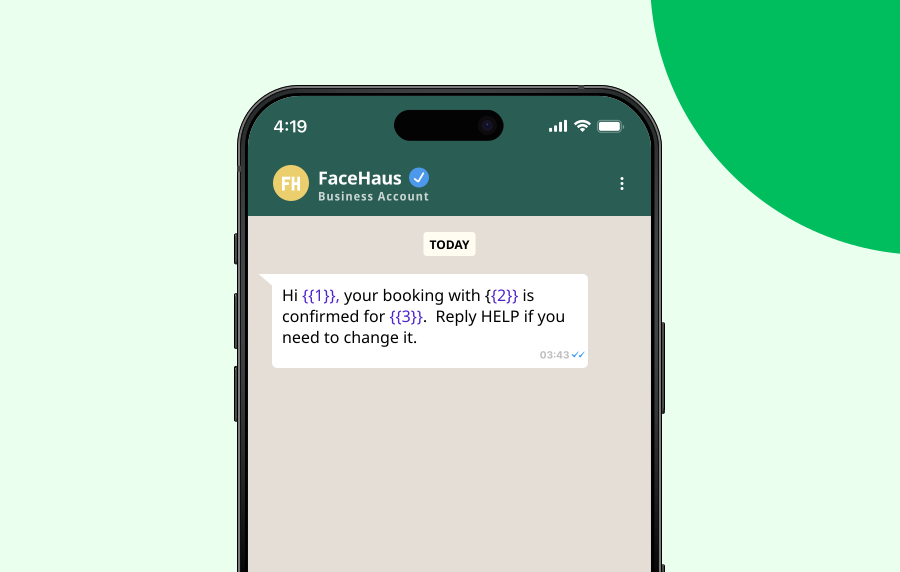 That gives the customer context, a clear reason for the message and a next action.
5. Submit the template for approval
Once the template is written, submit it through your WhatsApp Business setup or messaging provider.
Meta reviews templates and may reject messages that are unclear, miscategorised, formatted incorrectly or inconsistent with WhatsApp’s policies. Meta’s documentation also references template quality ratings, which can affect how templates perform over time.
Do not treat approval as a box-ticking step. The template should match the actual customer experience. If the campaign says it is an order update, the message should behave like an order update, not a disguised promotion.
6. Segment your audience before sending
WhatsApp mass messaging works better when it is targeted. Segment by use case, lifecycle stage, purchase behaviour, booking status, location or customer preference. Smaller, cleaner segments usually perform better than one large untargeted send, and they reduce the risk of customers blocking or reporting the business.
Good segmentation also helps with compliance. It makes it easier to prove why each person received the message and which opt-in applied.
7. Schedule and send the campaign
Once the template is approved and the audience is ready, schedule the campaign.
Check:
time zone
message category
template variables
opt-out language
audience suppression lists
link tracking
reply routing
fallback channel if WhatsApp fails
For urgent alerts, consider whether SMS should sit beside WhatsApp as a fallback. For rich campaigns, WhatsApp may be the better primary channel because it can support buttons, media and structured replies.
8. Track delivery, replies and opt-outs
Sending is not the end of the workflow.
Track delivery status, failed sends, replies, opt-outs and conversions. If customers reply, route those messages into the right team or automation flow. If they opt out, make sure suppression happens before the next send.
This is where a messaging platform matters. The value is not just sending the campaign. It is giving teams visibility into what happened next.
Best practices checklist
Before sending bulk WhatsApp messages, check that the campaign is ready.
The audience has clearly opted in to WhatsApp messages
The message type matches the customer’s consent
The template has been approved before send
Variables have been tested with real examples
The message identifies the business clearly
The customer has a simple way to opt out
Replies are routed to a person, bot or workflow
Delivery reports and failures are monitored
Suppression lists are applied before launch
SMS fallback is considered for urgent messages
Results are reviewed before the next campaign
When should you use WhatsApp instead of SMS?
Use WhatsApp when the message needs more than plain text. It is a strong fit for image-led campaigns, guided customer journeys, structured replies, rich product updates and service conversations where customers may want to ask follow-up questions.
Use SMS when broad reach, speed and simplicity matter more. SMS is still the stronger default for urgent alerts, one-time passcodes, appointment reminders and simple notifications where the message needs to reach a mobile number without relying on app usage.
Many businesses use both. WhatsApp can carry richer engagement, while SMS provides reach and reliability for time-sensitive sends.
Kudosity supports SMS fallback. If a customer isn't on WhatsApp, the message automatically falls back to SMS.
FAQs
No. WhatsApp bulk messaging should only be sent to people who have opted in to receive messages from your business. The person also needs to be reachable on WhatsApp. For broad mobile reach, SMS may be a better option.
Yes. WhatsApp applies messaging limits and quality controls, which can depend on factors such as account status, phone number quality, message category, and customer feedback. Limits can change over time, so businesses should confirm current thresholds with their WhatsApp provider before planning a large campaign
Yes. Businesses are required to obtain opt-in before messaging people on WhatsApp. For Australian commercial messaging, you should also consider Spam Act requirements around consent, sender identification and unsubscribe access.
Review the rejection reason, then check the message category, wording, variables and policy fit. Rewrite unclear or overly promotional content, make the customer value obvious, fix formatting issues and resubmit. If the template was rejected incorrectly, your provider may be able to help you review next steps.
No. WhatsApp mass messaging depends on WhatsApp Business Platform rules, opt-in consent and template approval. SMS bulk messaging sends directly to mobile numbers and does not require the WhatsApp app, but Australian commercial SMS still requires consent, sender details, and unsubscribe handling.
Yes, if your setup supports inbound messages and conversation handling. Replies should be routed into a shared inbox, CRM, automation flow or support team so the customer does not end up in a dead-end conversation.
It depends on the campaign. WhatsApp is stronger when you need rich content, structured replies or a conversational experience. SMS is stronger when reach, speed and simplicity matter most.
Join our Rich Messaging beta testing
Rich messaging combines the simplicity of SMS with the dynamic interactivity of app-like experiences, transforming how brands engage with their audience. With channels like Rich Communication Services (RCS) and WhatsApp.
Transform your customer engagement with richer media, interactivity, and branded experiences.
:quality(80))
:quality(80))
:quality(80))
:quality(80))
:quality(80))
:quality(80))