An AI agent can send an SMS in seconds. Knowing whether that message reached the customer, prompted a response or achieved its intended outcome requires more than a send confirmation.
An AI SMS workflow tracking template gives businesses a structured way to monitor every stage of automated messaging, from the initial trigger through to delivery, customer replies, AI decisions and final outcomes.
For development teams, it creates a consistent record of messaging events. For customer service, marketing and operations teams, it makes performance easier to understand. Instead of relying on send volumes alone, businesses can see which messages were delivered, where failures occurred, how customers responded and whether the AI agent resolved the interaction.
What is an AI SMS workflow tracking template?
An AI SMS workflow tracking template is a structured record used to monitor the events, decisions and outcomes of SMS messages triggered by artificial intelligence.
It captures key information about each message, including the customer, workflow, delivery status, errors, replies, AI actions and final business outcome.
For example, if an AI agent sends an appointment reminder, the template should show:
What triggered the reminder and which workflow it belongs to.
Whether the customer was eligible to receive the message.
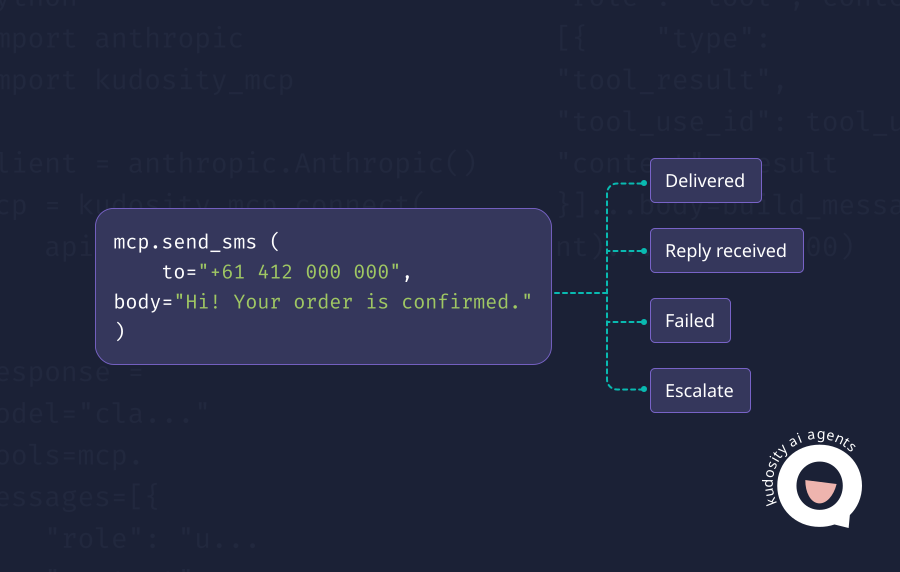
Whether the SMS was successfully sent and delivered.
Whether the customer replied and what their response meant.
What action the AI agent took after receiving the reply.
Whether a person needed to intervene.
Whether the appointment was confirmed, rescheduled or left unresolved.
The aim is to connect technical messaging data with actual customer outcomes.
An effective tracking setup uses two connected records: a message-level record showing the latest status and outcome, and an event log capturing every status change, reply and action. This preserves the full history without creating multiple customer messages every time a webhook arrives.
The AI SMS workflow funnel
An AI-powered SMS workflow can be measured using eight stages:

Triggered
Generated
Approved
Sent
Delivered
Replied
Resolved
Converted
Each stage answers a different question about the customer journey.
1. Triggered
A business event starts the workflow.
This could be a new lead entering the CRM, an appointment approaching, an abandoned cart, an overdue payment or a support request.
The trigger should be recorded with a workflow ID so subsequent messaging activity can be traced to the original event.
2. Generated
The AI agent prepares the message using approved customer information, business rules and message templates.
For example, an appointment reminder might include the customer's booking time, location and confirmation instructions.
Where AI generates variable content, the system should record the template or approved instructions used.
3. Approved
The message passes the relevant checks before sending.
These may include consent, recipient validation, sender identity, content restrictions, frequency limits and human approval for sensitive communications.
Approval does not always require manual intervention. Routine notifications can pass predefined rules automatically, while higher-risk messages may need a person to review them.
4. Sent
The SMS API accepts and processes the sending request.
The workflow records the message ID, recipient, timestamp and initial sending status. A successful API response does not necessarily mean the message reached the customer.
5. Delivered
The messaging provider receives a delivery confirmation where carrier reporting is available.
If the SMS fails or remains undelivered, the workflow should record the error and follow an appropriate retry, suppression or escalation process.
Delivery confirmation does not prove the customer read the message.
6. Replied
The customer responds to the SMS.
An inbound webhook captures the reply, which can then be classified by the AI agent. Common intents include confirmation, cancellation, rescheduling, questions, complaints and opt-outs.
7. Resolved
The workflow reaches a defined operational outcome.
For example, an appointment may be confirmed, a customer's question answered or a support case transferred to the right team.
A human handoff does not necessarily mean the issue is resolved. The system should distinguish between an escalated case and a completed interaction.
8. Converted
The customer completes the intended business action.
That might mean attending an appointment, completing a purchase, making a payment or submitting a review.
Not every workflow needs a reply or conversion event. A delivery alert may be successful once the notification is delivered, while an abandoned cart workflow needs an attributable purchase event to record conversion.
For accurate reporting, track which stages apply to each message type rather than forcing every interaction through all eight stages.
AI SMS workflow tracking template fields
The following fields provide a practical starting point for tracking AI-powered SMS activity.
| Field | What it records | Why it matters |
|---|---|---|
| workflow_id | Unique identifier for the workflow | Connects messaging activity to a booking, order, campaign or service process. |
| workflow_step | Current stage or action within the workflow | Shows where the message sits in the automated process. |
| customer_id | Internal customer or contact identifier | Links events to the correct customer record. |
| message_id | Unique identifier for the outbound SMS | Connects delivery events and replies to the correct message. |
| channel | Messaging channel, such as SMS | Supports reporting across SMS and other channels. |
| message_type | Purpose of the message | Separates reminders, notifications, marketing and support messages. |
| consent_status | Applicable consent or messaging permission state | Helps prevent unauthorised commercial messaging. |
| delivery_status | Latest known message status | Shows whether the message was sent, delivered, failed or remains pending. |
| error_code | Provider error or internal failure category | Explains failed messages and supports appropriate recovery. |
| reply_received | Whether an inbound customer response was received | Distinguishes one-way notifications from two-way conversations. |
| reply_intent | Meaning assigned to the customer response | Determines the next appropriate workflow action. |
| ai_action | Action the AI agent took after processing an event | Provides accountability for automated decisions. |
| human_handoff | Whether the interaction was transferred to a person | Measures escalation and identifies where automation needs support. |
| final_outcome | Latest completed business outcome | Connects messaging activity to operational and commercial results. |
These fields form the core template. Teams may also add timestamps, retry attempts, template IDs, receiving numbers, classification confidence and conversion values as their workflows become more complex.
Connecting the template to SMS APIs and webhooks
Most of these fields should be populated automatically rather than entered manually.
A typical integration works as follows:
A CRM or business application creates the workflow record.
The AI agent generates or selects a message.
The workflow checks sending permissions and calls the SMS API.
The API returns a message identifier.
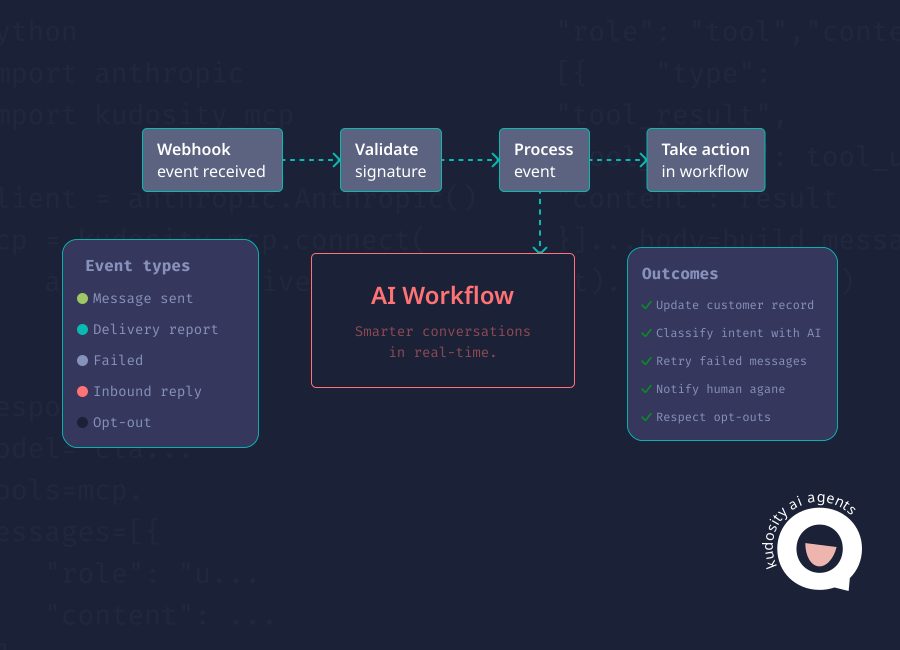
Delivery webhooks update the message status.
Inbound webhooks capture customer replies.
The AI agent classifies the reply and records its next action.
A business system updates the final outcome when it is confirmed.
Kudosity's SMS API documentation explains how developers can use a message_ref to correlate delivery events with records in their own systems.
Its V2 webhooks support SMS status, inbound message and opt-out events. These provide the signals needed to populate the tracking template.
The fields above are a recommended reporting structure, not an exact representation of Kudosity's native webhook payload. Developers should map the relevant API fields and events to their internal reporting model.
Example completed rows
The following examples show how the template might be populated for three common AI-powered SMS workflows.
All identifiers and outcomes are illustrative.
| Workflow | Delivery status | Customer reply | AI action | Human handoff | Final outcome |
|---|---|---|---|---|---|
| Appointment reminder | Delivered | "Yes" | Confirm appointment and update booking | No | Appointment confirmed |
| Abandoned cart | Failed | No reply | Suppress invalid number and flag contact record | No | Contact flagged for correction |
| Payment reminder | Delivered | "I've already paid" | Pause follow-up and create billing review task | Yes | Billing review opened |
Example 1: Appointment reminder
An AI agent sends an appointment reminder 24 hours before a scheduled booking.
Workflow ID: WF-APT-204
Customer ID: C-0182
Message ID: SMS-7001
Message type: Appointment reminder
Delivery status: Delivered
Reply intent: Confirmation
AI action: Update booking status to confirmed
Final outcome: Appointment confirmed
The delivery report confirms that the reminder reached the customer according to available reporting. The customer's reply then provides a separate confirmation signal.
Example 2: Abandoned cart
A customer abandons a checkout. The business has an applicable marketing consent record, so the AI workflow attempts an SMS follow-up.
Workflow ID: WF-CART-111
Customer ID: C-0194
Message ID: SMS-7002
Message type: Abandoned cart follow-up
Delivery status: Failed
Error category: Invalid number
Reply received: No
AI action: Suppress number and flag the contact record
Final outcome: Contact flagged for correction
The important result is not a conversion. It is identifying a contact-quality problem and preventing repeated failed attempts.
Example 3: Payment reminder
An AI agent sends an approved payment reminder to a customer. The customer replies that the payment has already been made.
Workflow ID: WF-PAY-051
Customer ID: C-0208
Message ID: SMS-7003
Message type: Payment reminder
Delivery status: Delivered
Reply intent: Payment query
AI action: Pause automated reminders and create a billing review
Human handoff: Yes
Final outcome: Billing review opened
The AI agent does not assume the payment has been received. It routes the request for verification and pauses further reminders while the matter is reviewed.
These examples demonstrate why delivery, reply and outcome data should be tracked separately. A delivered SMS is not necessarily a resolved customer interaction, and a failed SMS should not be counted as a successful notification.
Metrics to calculate
Once the template is populated, teams can measure the reliability of their messaging and the effectiveness of their AI workflows.
The seven metrics below provide a useful reporting baseline.
| Metric | Formula | What it measures |
|---|---|---|
| Delivery rate | Delivered messages ÷ attempted messages × 100 | Percentage of attempted SMS messages confirmed as delivered. |
| Failure rate | Failed or undelivered messages ÷ attempted messages × 100 | Proportion of SMS attempts that did not complete successfully. |
| Reply rate | Delivered messages receiving a reply ÷ delivered reply-capable messages × 100 | How frequently customers respond. |
| Opt-out rate | Unique opt-outs ÷ delivered eligible commercial messages × 100 | How frequently recipients unsubscribe. |
| AI resolution rate | Eligible conversations resolved by AI ÷ all resolved eligible conversations × 100 | Proportion of completed conversations resolved without human intervention. |
| Human escalation rate | AI-handled conversations escalated to a person ÷ all AI-handled conversations × 100 | Frequency of human intervention. |
| Conversion rate | Attributed conversions ÷ eligible delivered workflow messages × 100 | How often messages lead to the intended business action. |
Use consistent definitions for each metric. For example, the failure rate should specify whether it includes rejected and expired sends, while delivery reports that remain pending should not be treated as confirmed failures.
Delivery and failure performance
Delivery rate indicates whether the messaging infrastructure is reaching customers.
Failure rate helps identify technical problems, invalid contact information, sender configuration issues and other delivery barriers.
For meaningful reporting, measure messages from the same sending period and allow sufficient time for delivery statuses to settle. Otherwise, messages still awaiting carrier reports may distort the results.
Customer engagement and opt-outs
Reply rate is most useful for workflows where customers are invited to respond, such as appointment confirmations or customer service follow-ups.
Opt-out rate measures recipient dissatisfaction or changing communication preferences, particularly for commercial messaging.
Australian businesses must also follow applicable requirements under the Spam Act 2003, including consent, sender identification and functional unsubscribe mechanisms for commercial electronic messages.
An AI workflow should apply opt-out suppression independently of any discretionary AI decision.
AI resolution and human escalation
AI resolution rate shows how often an agent successfully completes eligible conversations without human intervention.
Human escalation rate measures how frequently interactions are passed to a person.
Neither metric should be viewed in isolation.
A low escalation rate is not necessarily positive if the AI is incorrectly closing complex customer cases. Similarly, a higher escalation rate may be appropriate for sensitive payment disputes or complaints.
Track the quality of outcomes alongside the volume of automated resolutions.
Conversion performance
Conversion rate links SMS activity to the business result it was designed to achieve.
The conversion event will vary by workflow:
Appointment reminders: Confirmed bookings or attended appointments.
Abandoned cart messages: Completed purchases.
Payment reminders: Verified payments received.
Customer support: Issues resolved.
Review requests: Reviews submitted.
Define an attribution window and conversion rules before measuring performance. Otherwise, a purchase or payment may be credited to SMS simply because it happened after the message was sent.
Building reliable AI SMS tracking with Kudosity
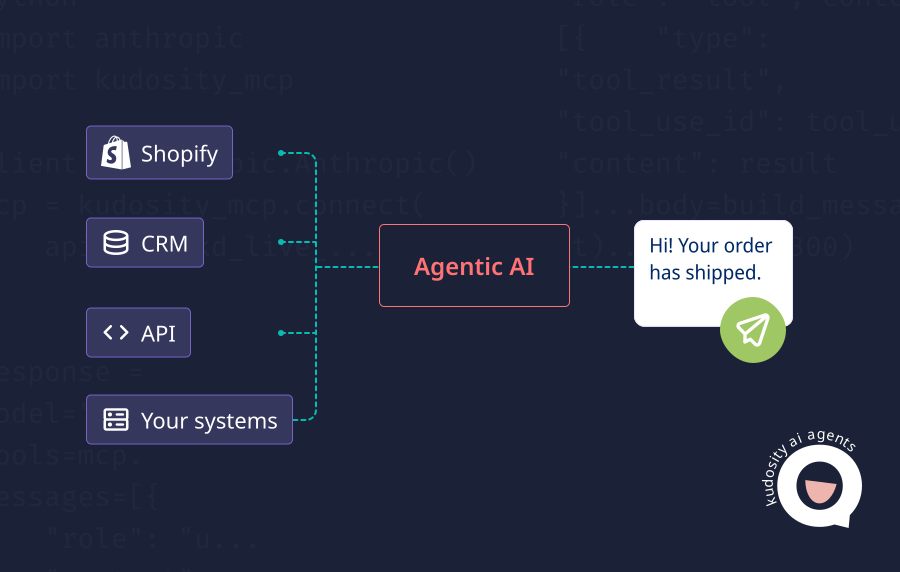
Kudosity provides the messaging infrastructure developers need to connect SMS activity to AI workflows and existing business systems.
Through its REST API, delivery reporting and webhook capabilities, teams can send messages, receive status updates, capture inbound replies and match messaging events to their internal workflow records.
For Australian businesses, this supports use cases ranging from appointment reminders and delivery notifications to AI-powered customer support and follow-up.
The tracking template then provides a common reporting structure across those workflows, helping teams answer three important questions: Was the message delivered? What happened after the customer received it? And did the interaction achieve the intended outcome?
Explore Kudosity's developer documentation to build SMS tracking into your AI agent workflows.
FAQs
Track the workflow ID, customer, message ID, consent status, delivery status, errors, inbound replies, AI actions, human handoffs and final outcome. This connects each automated message to its technical result and business impact.
Use delivery reports to measure successful and failed SMS attempts, and inbound webhooks to capture customer responses. Delivery rate measures the proportion of attempted messages confirmed as delivered, while reply rate measures responses against delivered messages where replies are supported.
An SMS message log should include the message ID, recipient, sender, timestamp, workflow ID, message type, consent status, delivery status, error code, reply information, AI actions, retry history and final outcome. Keep a separate event history to preserve each status change and action.
Combine delivery metrics with customer engagement and business outcomes. Track delivery rate, failure rate, reply rate, opt-outs, AI resolution rate, human escalation rate and conversion rate. Segment results by workflow type to identify where automation is effective and where changes are needed.