Sending an SMS is only one part of customer communication. What happens when the customer replies is just as important.
Inbound SMS tracking lets businesses capture customer responses, connect them to the original message and trigger the next action. That might mean confirming an appointment, updating an order, answering a question or escalating an issue to a support team.
For AI-powered SMS workflows, reply tracking provides the feedback needed to move beyond one-way notifications. With the right SMS API, webhooks and intent classification, businesses can automate routine responses while keeping people involved when the conversation requires more attention.
What is inbound SMS?
Inbound SMS refers to text messages received by a business from a customer or another mobile user.
In a two-way SMS workflow, an inbound message is often a reply to an outbound business SMS. For example, a customer might respond to an appointment reminder with:
"Confirm"
ask to reschedule a delivery, or reply:
"STOP"
to unsubscribe from marketing messages.
There is an important technical distinction. An SMS reply is connected to a message the business previously sent, while a new inbound SMS may arrive without an existing conversation. Both can be captured, but linking the message to the correct customer or workflow may require different logic.
Kudosity supports two-way messaging through virtual mobile numbers, allowing businesses to receive customer replies and route them into applications, CRMs or automated workflows.
How inbound SMS tracking works
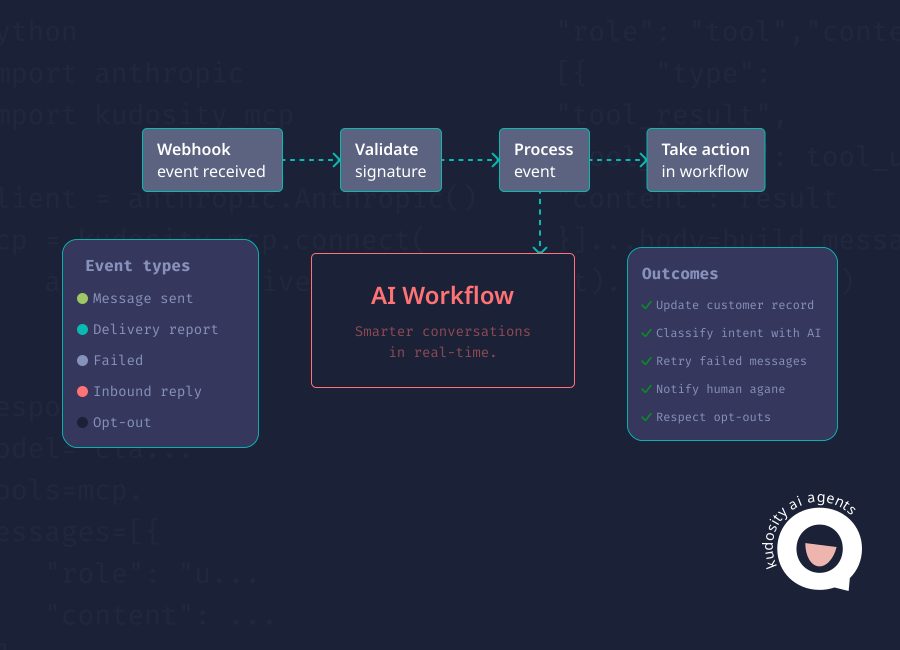
Inbound SMS tracking works by capturing a customer response through the messaging provider and passing it back to the business system.
A typical AI-powered workflow looks like this:

Customer replies
SMS provider receives reply
Webhook sends reply to your system
AI classifies intent
1. Customer replies
The customer responds to a message using a reply-capable number.
For example, an appointment reminder might ask the customer to reply YES to confirm or CHANGE to request another time.
2. SMS provider receives the reply
The SMS provider receives the incoming message through its messaging infrastructure.
The reply contains information such as the customer's mobile number, message content and timestamp.
3. Webhook sends the reply to your system
A webhook automatically notifies your application when the reply arrives.
Rather than repeatedly checking the SMS platform for new messages, your system receives the event through a configured callback.
Kudosity's REST API and webhook capabilities support incoming SMS notifications and delivery reporting, allowing messaging activity to feed back into existing workflows.
4. AI classifies intent
Once the reply reaches your system, an AI agent can interpret the message and determine what the customer needs.
A response such as:
"Can we move this to Friday?"
Might be classified as a rescheduling request. The workflow can then check available appointments or pass the request to the appropriate team.
Connecting replies to the original message
Accurate reply tracking depends on matching each inbound response to the right outbound message, customer and workflow.
Kudosity's reply callbacks can provide the original message ID, inbound response ID, mobile number, message content, timestamp and opt-out flag. Developers can use these details to link replies to existing records.
For unsolicited inbound messages, the system may need to match the sender number and receiving number to an existing customer record or conversation.
This prevents a reply from being assigned to the wrong campaign, booking or customer interaction.
What to store for each inbound SMS reply
A structured reply record makes it easier to automate responses, investigate issues and maintain accurate customer communication histories.
| Field | What it records | Why it matters |
|---|---|---|
| Reply ID | Unique identifier for the incoming message | Prevents duplicate processing and supports auditing. |
| Original message ID | Identifier of the outbound SMS, where available | Connects the reply to the original message or campaign. |
| Customer number | Mobile number that sent the reply | Identifies the customer and helps match CRM records. |
| Reply text | Exact customer response | Provides the information needed for AI classification. |
| Timestamp | Date and time the reply was received | Supports conversation history and response-time tracking. |
| Intent | The meaning assigned to the response | Determines which automated action should follow. |
| Workflow ID | Related booking, order, campaign or support process | Keeps the reply connected to the correct business activity. |
| Escalation status | Whether human review is needed or completed | Helps support teams identify unresolved requests. |
It is also useful to record the receiving number, classification confidence and final outcome.
Customer messages may contain personal or sensitive information, so businesses should apply appropriate access controls, retention rules and data handling practices.
Common SMS reply intent categories
AI-powered SMS workflows become more useful when responses are classified consistently.
Common intent categories include:
Yes or confirmation: The customer accepts an appointment, confirms an order or agrees to a proposed action.
No or cancellation: The customer declines, cancels or indicates they no longer want to proceed.
Reschedule: The customer requests a different appointment, delivery or service time.
Question: The customer needs additional information before taking action.
Complaint: The customer expresses dissatisfaction or raises a service issue.
STOP or opt-out: The customer asks to stop receiving certain business messages.
Unknown: The reply is unclear, incomplete or cannot be classified confidently.
Sensitive request: The customer raises a matter involving personal information, financial circumstances or another issue requiring additional care.
Not every response should trigger an automatic reply. A clear confirmation can usually be processed without intervention. A complaint, sensitive request or unclear message may need a person to review it.
AI reply handling workflow
Once a message has been classified, the workflow needs a clear rule for what happens next.
| Reply type | Recommended AI action |
|---|---|
| Simple confirmation | Update the relevant booking, order or CRM record and send an approved acknowledgement if needed. |
| Customer question | Retrieve approved information and respond if the answer is clear and within the agent's permissions. |
| Complaint | Create or update a support case and escalate to a human agent with the conversation history. |
| STOP or opt-out | Immediately suppress relevant marketing sends, update consent records and log the request. |
| Unknown reply | Ask a limited clarifying question or transfer to a person if the intent remains unclear. |
For example, an AI agent might send an appointment reminder. The customer replies:
"I can't make Thursday. Do you have Friday?"
The webhook captures the response, the system links it to the original booking and the AI classifies the message as a rescheduling request.
The workflow can check available times, offer a suitable alternative and update the booking once the customer confirms. If no suitable appointment exists, the request moves to a team member.
The value is not simply automated replies. It is keeping the conversation connected to the underlying business process.
Handling STOP replies and Australian compliance
Opt-out handling should sit outside discretionary AI classification wherever possible.
Explicit keywords such as STOP should trigger deterministic suppression rules, rather than relying on an AI agent to interpret whether the customer wants to unsubscribe. Other wording, such as:
"please don't contact me again"
should also be recognised and reviewed as an opt-out request.
Under Australia's Spam Act 2003, commercial electronic messages generally require consent, sender identification and a functional unsubscribe option. ACMA requires unsubscribe requests to be honoured within five working days, although immediate suppression is the safer operational approach.
Businesses should also ensure their sender setup supports the advertised unsubscribe method. Alphanumeric sender IDs generally cannot receive SMS replies, so a reply-capable number or another compliant unsubscribe mechanism is needed.
These controls matter when AI agents are generating follow-ups or running campaigns automatically. Once a recipient opts out, the workflow must prevent further marketing sends covered by that request.
Track replies, delivery and failures together
Inbound replies provide useful context, but they do not tell the whole story.
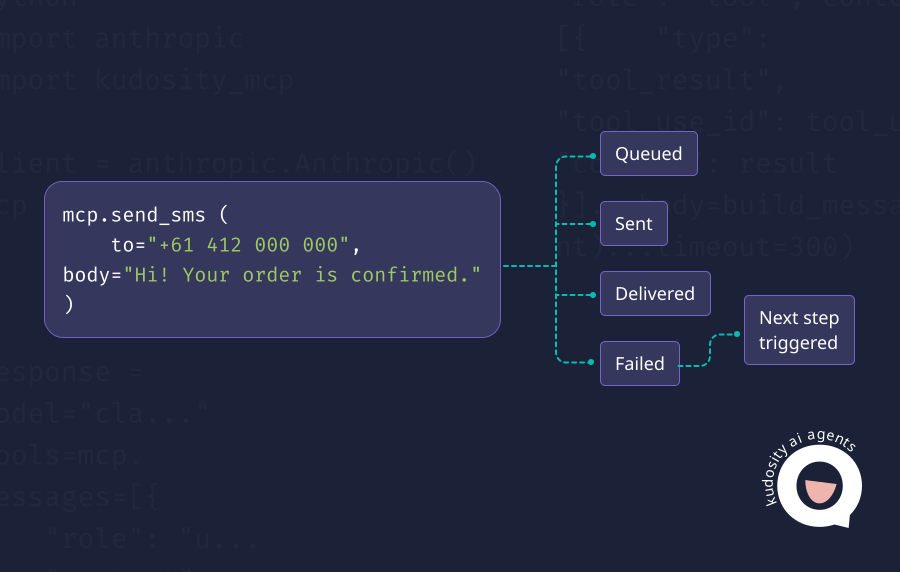
An AI-powered SMS workflow should also track outbound delivery reports and failed messages. These events answer different questions:
Delivery tracking: Did the message reach the recipient, where delivery confirmation is available?
Reply tracking: Did the customer respond, and what did they say?
Failure tracking: Was the message rejected, undelivered or affected by another issue?
Combining these signals allows the workflow to make better decisions.
For example, an appointment reminder that fails may require another contact method. A delivered reminder with a rescheduling reply should trigger a booking update. A reply indicating dissatisfaction should be routed to support rather than an automated promotional follow-up.
Kudosity's SMS API supports delivery reports and incoming message callbacks, helping developers connect these events to customer records and AI workflows.
How Kudosity supports inbound SMS tracking
Kudosity gives Australian businesses the messaging infrastructure needed to send, receive and track SMS through connected systems.
With REST API access, webhooks, virtual mobile numbers and delivery reporting, development teams can build workflows that capture replies, identify customer intent and update business applications.
For organisations introducing AI-powered messaging, this provides the underlying events that agents need to act on actual customer responses rather than assumptions.
Kudosity also supports Australian businesses with local messaging expertise, direct carrier relationships and security controls suited to customer communication workflows.
Explore Kudosity's REST API or integration options to connect two-way SMS with your CRM, support platform or AI agent workflows.
FAQs
SMS replies can be tracked through a two-way SMS provider that supports inbound messaging and webhooks. When a customer responds, the provider sends the reply details to your system, where they can be linked to the original message, customer record and workflow.
Yes. Automated SMS messages can receive replies when sent using a reply-capable number and a provider that supports two-way messaging. Replies can be delivered to a dashboard, CRM or webhook endpoint.
Yes. AI agents can classify inbound SMS responses into categories such as confirmation, cancellation, reschedule, question or complaint. The classification can trigger an approved next step, although uncertain or sensitive responses should be escalated for human review.
Connect your SMS provider to the CRM through an API, webhook or supported integration. When a reply arrives, the workflow matches it to the customer record using identifiers such as the mobile number, message ID and workflow reference. It can then update the contact, booking, support case or conversation history.
STOP replies should trigger an immediate opt-out process for the relevant marketing messages. Update the customer's consent status, suppress further applicable sends and retain a record of the request. Australian businesses must comply with the Spam Act 2003, including requirements for consent and functional unsubscribe mechanisms.