SMS Webhooks for AI Workflows
AI-powered SMS workflows need more than a send endpoint. If an AI agent sends a customer message, your system still needs to know what happened next. Was the message sent? Was it delivered? Did it fail? Did the customer reply? Did they opt out?
SMS webhooks make those answers available in real time. They send messaging events back to your system so the AI workflow can update records, classify replies, retry failed messages or hand the conversation to a person when needed.
What is an SMS webhook?
An SMS webhook is a way for a messaging platform to send real-time event updates back to your application.
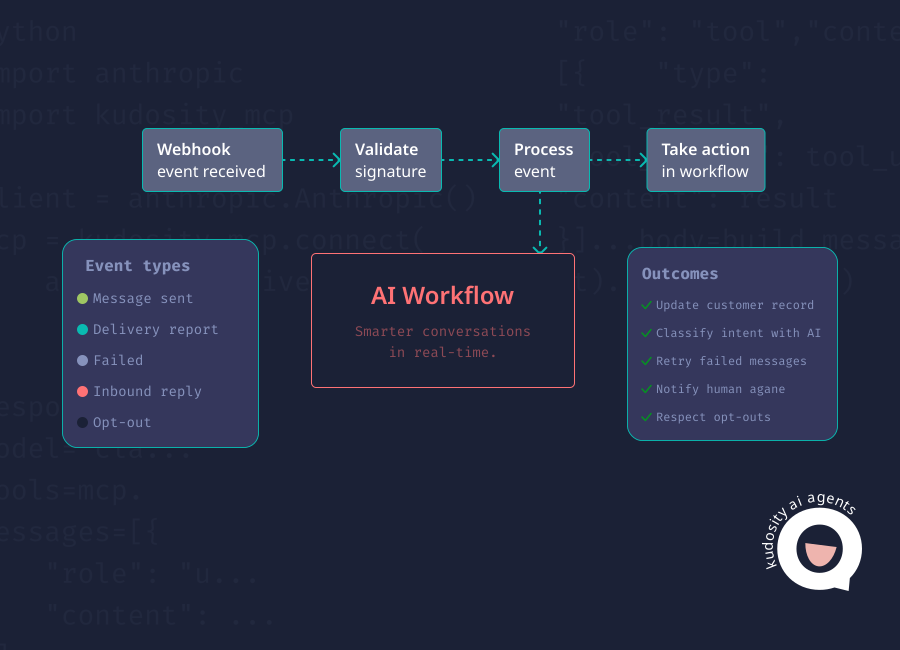
Instead of your system repeatedly checking for new information, the SMS provider notifies your endpoint when something happens. That event might be a sent message, a delivery report, a failed send, an inbound reply or an opt-out.
Kudosity’s developer documentation describes webhooks as a way to notify your application when events happen, including receiving an SMS message. Its SMS status events can include internal statuses such as sent and failed, as well as delivery receipts such as delivered and undelivered.
In practical terms, an SMS webhook keeps your workflow informed without relying on manual checks.
Why webhooks matter for AI SMS workflows
AI agents need feedback loops.
A basic SMS API can send a message, but an AI workflow needs to understand what happened after the send. Without delivery reports, reply events and failure signals, the agent is working from assumptions.
That matters in customer messaging. If a payment reminder fails, the workflow may need to try another channel. If a customer replies “I already paid”, the AI agent should not send another reminder. If someone replies “STOP”, the system needs to record the opt-out before any further messaging occurs.
Kudosity’s SMS API materials reference real-time delivery reports, reply notifications, SMS triggers and link tracking callbacks through webhooks. Its AI agent documentation also references correlating delivery webhooks back to a record in your system, which is the kind of event loop AI workflows need.
The purpose is simple: every message should create a trackable event that helps decide the next action.
Common SMS webhook events
Different providers use different event names. The table below uses a simple event model that developers can map to their provider’s actual statuses.
| Event | Meaning | AI workflow action |
|---|---|---|
| message.sent | The message request was accepted and sent by the platform. | Update the workflow status to sent and wait for delivery confirmation. |
| message.delivered | The message was confirmed as delivered where delivery reporting is available. | Mark the customer notification as complete or move to the next step. |
| message.failed | The message failed before reaching delivery routing or could not be processed. | Retry if appropriate, check the error code or escalate for review. |
| message.undelivered | The message could not be delivered to the recipient. | Suppress invalid numbers, try another channel or trigger a support task. |
| reply.received | The customer replied to the SMS. | Send the reply text to AI intent detection and decide the next workflow action. |
| opt_out.received | The customer opted out, often by replying STOP or using an unsubscribe link | Update consent status, suppress future marketing messages and log the event. |
Kudosity’s API reference includes SMS status, inbound SMS and opt-out event types, which cover the operational events most AI messaging workflows need.
Example webhook payload
A webhook payload should give your system enough information to match the event to the original message, understand the status and decide what happens next.
{
  "message_id": "msg_123456789",
  "event_type": "reply.received",
  "status": "received",
  "recipient": "+61412345678",
  "timestamp": "2026-08-21T12:56:00+10:00",
  "error_code": null,
  "reply_text": "Can I reschedule for tomorrow?"
}
For delivery or failure events, the reply_text field may be empty. For reply events, the reply_text becomes the input for classification. For failed or undelivered events, the error_code helps determine whether the workflow should retry, suppress the number or escalate to a person.
AI workflow example
A practical AI-powered SMS workflow looks like this:

SMS sent
Delivery webhook
Reply webhook
AI intent detection
Next workflow
1. SMS sent
The AI agent decides a customer should receive a message. This might be an appointment reminder, payment follow-up, delivery update or support response. The SMS is sent through an approved API.
2. Delivery webhook
The messaging platform sends a webhook when the message status changes. If the message is delivered, the workflow can continue. If it fails, the system can decide whether to retry, switch channel or create a support task.
3. Reply webhook
If the customer replies, the inbound message is sent back to your system through a webhook. This keeps the customer response connected to the original workflow instead of leaving it in a separate inbox.
4. AI intent detection
The AI agent classifies the reply. For example:
“Yes” becomes appointment confirmed
“Can I change this?” becomes reschedule request
“I already paid” becomes payment dispute or billing review
“STOP” becomes opt-out
“I need help” becomes human support required
5. Next workflow
The system triggers the next step. That might be updating a CRM, changing a booking, notifying a support agent, sending a follow-up message or closing the notification loop.
This is how webhooks support delivery, reply and failed message tracking from an AI-powered SMS workflow. They give the agent real events to work from, not just assumptions about whether a message was successful.
How to design webhook handling for AI workflows
AI messaging needs practical controls before it goes live.
Match every event to a record
Use the message ID, recipient and any internal reference to connect webhook events back to the original customer, case, booking or order.
Keep status changes structured
Avoid storing webhook events as loose notes only. Use structured fields such as sent, delivered, failed, undelivered, replied and opted out so the workflow can act on them.
Treat replies as workflow inputs
A reply should not sit unread. Send it into intent detection, then route it to automation or a person depending on confidence and risk.
Handle failures clearly
A failed message should trigger a defined response. That may mean retrying once, checking the number format, switching to another channel or escalating.
Respect opt-outs immediately
If a customer opts out, update their consent status before any further marketing messages are sent. For Australian commercial messaging, the ACMA says messages need consent, sender identification and a functional unsubscribe option.
Log AI-triggered activity
Record what the agent sent, why it sent it, which tool it used and what happened next. This helps with support review, compliance checks and debugging.
Where Kudosity fits
Kudosity supports SMS webhooks, delivery reporting, inbound replies and AI agent workflows through its messaging APIs. Its developer resources describe webhooks for immediate notification of events such as SMS delivery and incoming messages, while its AI agent documentation shows how delivery webhooks can be correlated back to system records.
That makes Kudosity a strong fit for Australian teams building AI-powered SMS workflows where delivery tracking, reply handling, failed message management and opt-out control all need to feed back into the customer record.
For developers, the value is the event loop. For the business, the value is control: messages are sent, tracked, interpreted and acted on inside a workflow the team can review.
Explore the Kudosity developer portal
Integrate SMS and MMS into your applications with our flexible API. Our REST SMS API allows seamless integration of SMS capabilities into your applications, whether you're launching a new app or enhancing an existing one.
FAQs
An SMS webhook is a real-time notification sent from an SMS platform to your system when a messaging event happens. Events can include sent messages, delivery reports, failed sends, inbound replies and opt-outs.
SMS webhooks track delivery by sending status updates to your configured endpoint when the message status changes. Depending on provider and carrier reporting, that status may show sent, delivered, failed, undelivered or another delivery state.
Yes. If two-way SMS is enabled, inbound replies can be sent to your system through a webhook. The reply can then be stored, classified by an AI agent or routed to a support workflow.
Webhooks give AI agents feedback. They show whether a message was delivered, whether it failed, whether the customer replied and whether the customer opted out. The agent can then use those events to trigger the next action.
When an SMS fails, the provider can send a failure webhook with a status and error code. Your workflow can then decide whether to retry, correct the number, suppress the contact, switch channel or escalate the issue to a person.
Get ready for Australia’s SMS Sender ID Registry
From July 2026, Sender ID registration will be required. ACMA’s final steps are still in progress, but Kudosity will keep you informed and help you be ready when registration opens.