MCP Server vs REST API: Which Should You Use for AI Messaging?
AI agents are changing how businesses build and manage customer messaging. But when it comes to connecting an AI assistant to an SMS platform, there are two common approaches: MCP servers and REST APIs.
Both can enable AI-powered messaging, but they serve different purposes.
An MCP server gives AI assistants a standardised way to access messaging tools. A REST API gives applications and backend systems direct control over how messages are sent, received and tracked.
For Australian businesses building AI SMS workflows, the best approach often involves both. MCP makes it easier for AI assistants to discover and use approved tools, while REST APIs provide the predictable execution needed for production messaging.
The right choice depends on what you're building, how much control you need and whether the workflow is intended for internal use or customer-facing operations.
What is the difference between MCP and a REST API?
MCP and REST APIs both connect software to external services, but they operate at different levels.
What is an MCP server?
A Model Context Protocol (MCP) server provides a standard way for AI applications to access external tools, information and actions.
Instead of building a separate integration for each AI assistant, developers can expose approved functions through MCP. Compatible assistants can discover those tools, understand their inputs and call them when needed.
For example, an AI assistant connected to the Kudosity MCP Server can access tools for sending SMS, retrieving message statuses, managing contacts and configuring webhooks.
A developer might ask:
"Send an SMS reminder to my test number and check whether it was delivered."
With the right permissions and approval, the assistant can identify the relevant messaging tool and execute the request.
MCP provides the connection between the AI application and the tool. The underlying messaging operation still relies on Kudosity's APIs and infrastructure.
What is a REST API?
A REST API is a software interface that allows applications to communicate with external systems through HTTP requests.
In messaging, REST APIs enable developers to build SMS capabilities directly into websites, applications, CRMs, booking platforms and backend workflows.
For example, a booking system might automatically send an appointment reminder 24 hours before a scheduled visit.
The application determines when the message should be sent, checks the relevant conditions and submits the request to the SMS API.
Unlike an AI assistant selecting a tool based on a prompt, the application follows predefined program logic.
Kudosity's REST API supports SMS and other messaging integrations, with delivery reporting, inbound replies and webhook capabilities.
The key distinction is how the action is initiated and controlled.
MCP helps AI applications access tools. REST APIs allow software applications to execute messaging operations directly.
MCP vs REST API comparison
The following table outlines the practical differences when choosing between MCP and REST APIs for AI-powered messaging.
| Comparison | MCP server | Rest API |
|---|---|---|
| Best for | AI assistants, developer tools, internal workflows and agent-driven actions. | Production applications, automated messaging and backend integrations. |
| User interface | Often accessed through conversational AI tools such as Claude or compatible development environments. | Usually accessed through application code, backend services or integrated business systems. |
| Control | Exposes approved tools that an AI assistant can select and invoke. Requires permissions and action-level safeguards. | Uses explicit application logic to control requests, validation, retries and workflow execution. |
| Reliability | Depends on the agent, tool configuration, permissions and underlying API. Less predictable when tool selection is left entirely to the model. | Well suited to repeatable, deterministic execution with controlled error handling and monitoring. |
| Typical use case | Asking an AI assistant to prepare and send an approved SMS or investigate a message status. | Automatically sending thousands of reminders or notifications from a business application. |
Neither approach guarantees reliable delivery or legal compliance on its own.
Both ultimately depend on the messaging provider, carrier network, sender configuration and controls implemented around the workflow.
When to use MCP
MCP is particularly useful when AI assistants need to interact with messaging tools without developers creating a separate integration for every AI application.
AI assistants and agent-driven messaging
An AI assistant can use an MCP server to perform approved messaging actions based on natural-language instructions.
For example, a team member might ask an assistant to prepare an SMS for a customer, retrieve a message status or investigate a failed notification.
With Kudosity's installable MCP server, compatible assistants can access native tools including send_sms, get_message and list_messages.
This is useful when a person is actively supervising the workflow and approving actions where appropriate.
Developer support and API exploration
MCP can also help development teams work with unfamiliar APIs.
Kudosity's hosted MCP server supports API discovery, documentation searches, code generation and API request execution.
Instead of manually searching documentation for every endpoint, developers can ask an AI coding assistant to identify the appropriate operation or generate an integration example.
This can reduce setup time when building new messaging capabilities.
Internal workflows
MCP works well for controlled internal tasks such as:
Sending approved test messages.
Checking whether an SMS was delivered.
Reviewing message records.
Retrieving account information where authorised.
Exploring available API operations.
These workflows benefit from conversational access without necessarily requiring a dedicated user interface.
Prototyping AI messaging workflows
For teams testing AI-powered customer communication, MCP provides a practical way to validate an idea.
A developer can connect a compatible assistant to Kudosity, test SMS sending and review the returned results before building a complete backend integration.
However, once the workflow needs guaranteed sequencing, higher volumes or more complex operational controls, direct REST API integration may be a better fit.
When to use REST API
REST APIs are generally the stronger choice when messaging is an established part of a production application or business process.
Production SMS sending
When messages are triggered by defined events, direct API integration provides greater control over execution.
An appointment booking system, for example, should not need an AI assistant to decide whether to send a standard reminder every time.
The backend can check the booking, confirm the reminder is due, verify sending permissions and submit the SMS request automatically.
AI can still contribute to the process, but the actual send remains controlled by the application.
High-volume messaging
High-volume SMS workflows require predictable throughput, queuing, monitoring and error handling.
Direct REST API integration makes it easier to manage:
Message queues and throughput limits.
Retry rules and duplicate prevention.
Delivery reports and failure handling.
Contact suppression.
Application-level monitoring.
For large-scale notifications or transactional messaging, these controls become more important than the ability to initiate a send through natural language.
Deterministic workflows
Some customer communications need to follow the same process every time.
Security codes, payment notifications and operational alerts are examples where the sending decision should be governed by explicit business rules.
A REST API allows the application to execute those rules without relying on a model to select the next action.
CRM and application integrations
REST APIs are useful when messaging must be embedded directly into an existing business system.
An ecommerce platform might trigger delivery notifications. A CRM might send a follow-up when a lead reaches a particular stage. A support platform might update a customer when a case is resolved.
In each situation, messaging becomes part of the existing application rather than a separate AI assistant interaction.
Compliance-heavy workflows
Businesses operating under strict security, privacy or regulatory requirements often need precise control over customer data and messaging actions.
REST API integrations allow developers to enforce consent checks, sender requirements, template approval, access permissions and audit logging within their own applications.
For Australian commercial messaging, businesses must consider the requirements of the Spam Act 2003, including consent, sender identification and functional unsubscribe mechanisms.
These obligations still apply when an AI agent initiates the message.
When to use both
MCP and REST APIs are complementary. They can form different parts of the same AI messaging architecture.
For many businesses, combining them provides a practical balance between AI flexibility and operational control.
MCP for AI-assisted development
MCP gives developers and AI assistants a convenient way to explore APIs, generate integration code, inspect message data and invoke approved tools.
It can also provide a controlled interface for an agent to request a messaging action.
REST API for production execution
The backend application receives the approved action and executes it through the REST API.
This keeps validation, consent checks, retries, message queues and sending rules within software the business controls.
For example, an AI agent may determine that a customer needs a payment reminder. The backend still decides whether the reminder is permitted, selects an approved template and sends the message through the REST API.
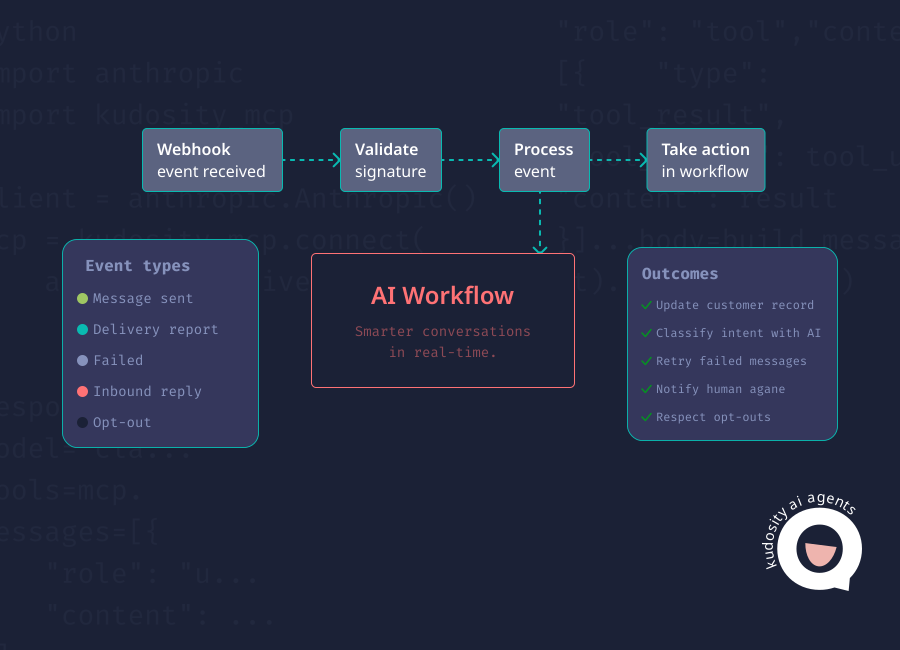
Webhooks for delivery and reply tracking
After the message is submitted, the workflow needs to know what happened.
Webhooks send delivery status changes and inbound replies back to the application.
Kudosity's webhook API supports messaging events that can be used to update customer records and trigger further workflow actions.
A customer reply can then be passed to an AI agent for intent classification.
For example, a reply stating "I've already paid" could trigger a billing review rather than another automated reminder.
Audit logs for governance
Every action should be traceable.
The application should record the original trigger, AI decision, approval result, message ID, delivery status, customer reply and final outcome.
This makes it easier to investigate failures, review AI decisions and demonstrate how customer communications were handled.
Recommended AI messaging architecture
architecture offers a practical way to separate AI decision-making from message execution.
A recommended model looks like this:

AI assistant
MCP for tool access
Backend workflow
REST API
Webhooks
Audit log
1. AI assistant
The AI assistant interprets the request or customer event.
It might identify that an appointment needs confirming or that a support enquiry requires follow-up.
2. MCP for tool access
The assistant uses MCP to access approved tools and request a messaging action.
Rather than providing unrestricted access to customer communications, developers can expose a limited set of operations.
For production use, an MCP tool can be designed to request an action through the business's backend rather than sending directly.
3. Backend workflow
The backend validates the request.
This is where the application checks customer identity, consent, message templates, sending limits, sender configuration and whether human approval is required.
It also prevents duplicate sends and records the reason for the action.
4. REST API
Once approved, the backend calls the Kudosity REST API to send the SMS.
The application stores the returned message ID alongside its internal workflow reference.
Kudosity's AI agent messaging guide explains how message_ref can be used to connect outgoing messages with subsequent webhook events.
5. Webhooks
Delivery updates and inbound replies are sent asynchronously to the backend through configured webhooks.
The system uses these events to update message statuses and trigger next steps.
A failed SMS might create an operational alert. A customer reply might be classified by AI and routed to the appropriate workflow.
Webhooks are a separate event channel. They do not need to pass back through MCP unless the architecture specifically requires that connection.
6. Audit log
The application records each meaningful event.
This includes the request, approval, API response, delivery event, inbound reply, AI action and final outcome.
An audit trail helps developers troubleshoot integrations while giving operations and compliance teams visibility over automated messaging.
How this works in practice
Consider an AI-powered appointment reminder.
The AI assistant identifies an upcoming appointment and requests a reminder through an approved MCP tool.
The backend checks the booking record, verifies the recipient and confirms that a reminder has not already been sent.
It then uses the REST API to send the message.
A delivery webhook updates the booking record when delivery information becomes available. If the customer replies "Can I move it to Friday?", an inbound webhook passes the reply into the workflow.
The AI agent can classify the request as rescheduling and check available appointment times.
If the request cannot be resolved within its permissions, the workflow transfers the conversation to a person.
Throughout the process, the system records what was sent, what happened next and whether the appointment was confirmed or rescheduled.
This approach allows AI to contribute where it adds value without leaving critical sending decisions uncontrolled.
Choosing the right approach with Kudosity
Kudosity supports both MCP and REST API integration, allowing Australian businesses to choose an approach that fits their development requirements.
The Kudosity MCP Server provides native messaging tools for compatible AI assistants, alongside API discovery and development capabilities.
Kudosity's REST API gives developers direct access to SMS sending, delivery reporting, inbound replies and other messaging operations.
For teams building customer-facing AI workflows, the choice depends on where decisions are made and how they need to be controlled.
Use MCP when an AI assistant needs to discover, request or perform approved messaging actions. Use REST APIs when messaging must run predictably within a production application. Combine them when AI flexibility and backend control are both required.
With webhooks and audit logging added to the architecture, businesses can track the complete messaging workflow from initial request through to customer response and final outcome.
FAQs
No. MCP is a protocol that standardises how AI applications connect to tools and external systems. A REST API is an interface that allows applications to communicate through HTTP requests. MCP tools can use REST APIs behind the scenes, but the two serve different purposes.
Use MCP when an AI assistant needs to access messaging tools through natural-language instructions or an agent workflow. Use a REST API when SMS must be integrated directly into an application, CRM or backend process. For many AI-powered messaging projects, combining both is the most practical approach.
Yes. An MCP server can expose tools that send real SMS messages. However, production use requires authentication, permissions, consent checks, monitoring, rate limits and reliable error handling. For high-volume or tightly controlled messaging, routing MCP requests through a backend workflow can provide stronger operational safeguards.
AI agents do not always need to call REST APIs directly. They can use MCP tools or other interfaces to perform actions. However, REST APIs often provide the underlying connectivity that allows those tools to interact with messaging platforms and business systems.
Yes. MCP can give an AI assistant access to approved tools, while a REST API handles message execution through the backend application. Webhooks can then report delivery events and customer replies, allowing the AI agent or business workflow to determine what happens next.
Keep exploring

Ready for more in-depth messaging insights?
Discover 2026 messaging trends with this free guide, offering insights on how to reach more customers, boost engagement, and stay compliant with Australian privacy laws

