:quality(80))
Bring verified, branded RCS messaging to your existing Kudosity workflows, without building a new integration.
You have already invested in the way you communicate with customers. Your campaigns are established, your automations are running, and your systems are connected. Adopting a new messaging channel should not mean rebuilding all of that.
Kudosity’s No Code RCS Upgrade, also known as SMS via RCS, lets you bring RCS to the messaging you already send. Whether you use our SMS API, send campaigns through Kudosity or manage conversations in Inbox, you can keep your existing workflows.
Once your RCS agent is approved and we enable the upgrade on your account, eligible messages are sent through RCS first, with automatic SMS fallback when a recipient cannot be reached over RCS.
You enable RCS; you do not recode your system.
Why bring RCS to your messaging?
RCS, or Rich Communication Services, brings a more recognisable and verified identity to business messaging. Your messages can appear under your registered business profile, with your brand name, logo and business information. This helps recipients understand who is contacting them before they open or act on a message.
RCS also adds stronger protection than standard SMS. Messages are encrypted in transit, while the verified sender profile gives customers clearer signals that a message genuinely comes from your business.
RCS creates opportunities beyond text too. Rich cards combine imagery, descriptions and actions, while carousels let customers browse multiple options within a message. Buttons can make it easier to respond or take the next step—all within the messaging app customers already use.
RCS can also provide greater delivery visibility. Where available, delivery and read statuses help you understand whether messages reached the recipient and were seen.
But you do not need to build that entire experience before you get started.
With SMS via RCS, you can begin with verified, branded delivery for your existing text messages. You retain your current workflows, avoid the development work of a new integration and learn where RCS adds value for your audience. Richer experiences can come later.
Two pathways to RCS
There are two ways to bring RCS into your Kudosity messaging: upgrade your existing SMS workflows without code, or build a direct RCS integration for richer message formats.
The right starting point depends on what you want to achieve, not simply whether you have developers available.
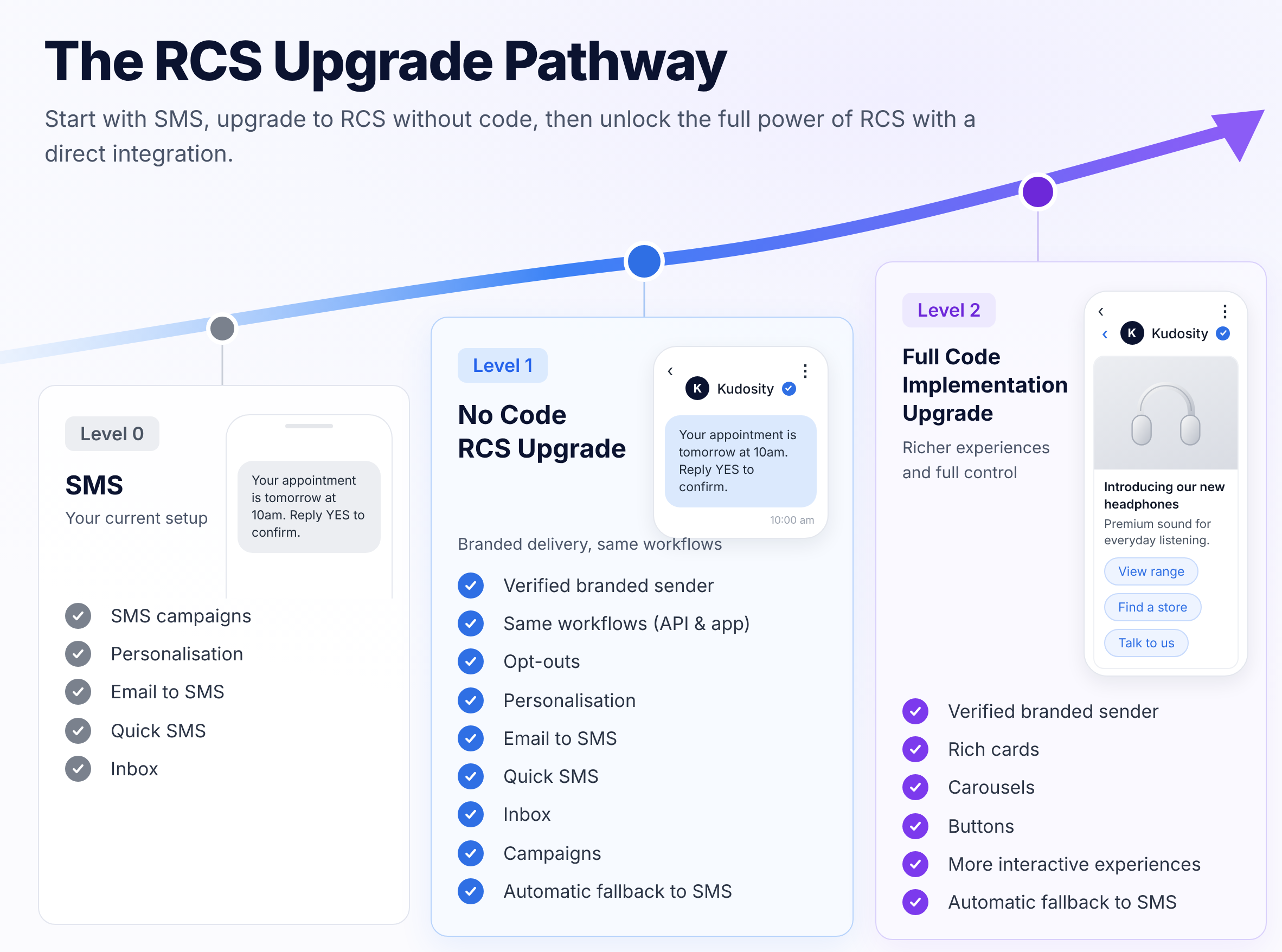
Pathway 1: No Code RCS Upgrade
SMS via RCS: getting started without starting over.
This pathway is designed for existing Kudosity customers, whether you send through the API or use Kudosity’s messaging tools.
For API customers, your existing SMS integration continues to send messages as it does today. You do not need to switch endpoints or rewrite your sending logic to take advantage of RCS delivery.
For application users, you keep working with the tools you already know: Campaigns, Inbox, Quick SMS and Email to SMS. Existing features such as personalisation and opt-outs remain part of your workflow.
Kudosity handles the delivery change behind the scenes. Once enabled, eligible messages are sent using your registered RCS agent. When the recipient cannot be reached over RCS, automatic SMS fallback provides the alternative delivery route.
For example, an appointment reminder generated by your existing system can arrive as a text message from your verified RCS business profile. You have not rewritten the reminder or rebuilt the integration; the delivery channel and sender presentation have changed.
The value is straightforward: verified, branded messaging with stronger protection and better delivery visibility—without a new integration project. Your team can start using RCS without diverting development resources from other priorities.
This upgrade does not automatically turn existing text messages into rich cards, carousels or button-based experiences. It brings your existing messages into RCS; the second pathway lets you design specifically for its richer capabilities.
Pathway 2: Full Code Upgrade
Build a direct RCS integration for richer customer experiences.
For businesses ready to go beyond their existing text messages, a direct integration lets you design messages specifically for RCS.
Your developers build or update your integration to send through the Kudosity RCS endpoint:
POST https://api.transmitmessage.com/v2/rcs/messagesThe direct API also supports configurable SMS fallback, allowing your integration to provide an alternative text message when RCS delivery is unavailable.
This pathway is for experiences built around:
Rich cards: present an image, supporting information and a clear next action together.
Carousels: let customers browse a collection of products, services or options.
Buttons: offer convenient replies and actions rather than asking customers to type every response.
For example, a retailer could move from a text promotion containing a link to a carousel that presents several products with individual actions. A service business could build an appointment message with clear response options.
You retain the branded sender experience while gaining more control over the message content and interaction. The trade-off is development work: your integration needs to construct those messages and handle the interactions your experience supports.
How the No Code RCS Upgrade works
There’s a one-time setup and approval process. After that, you keep sending messages the way you do today.
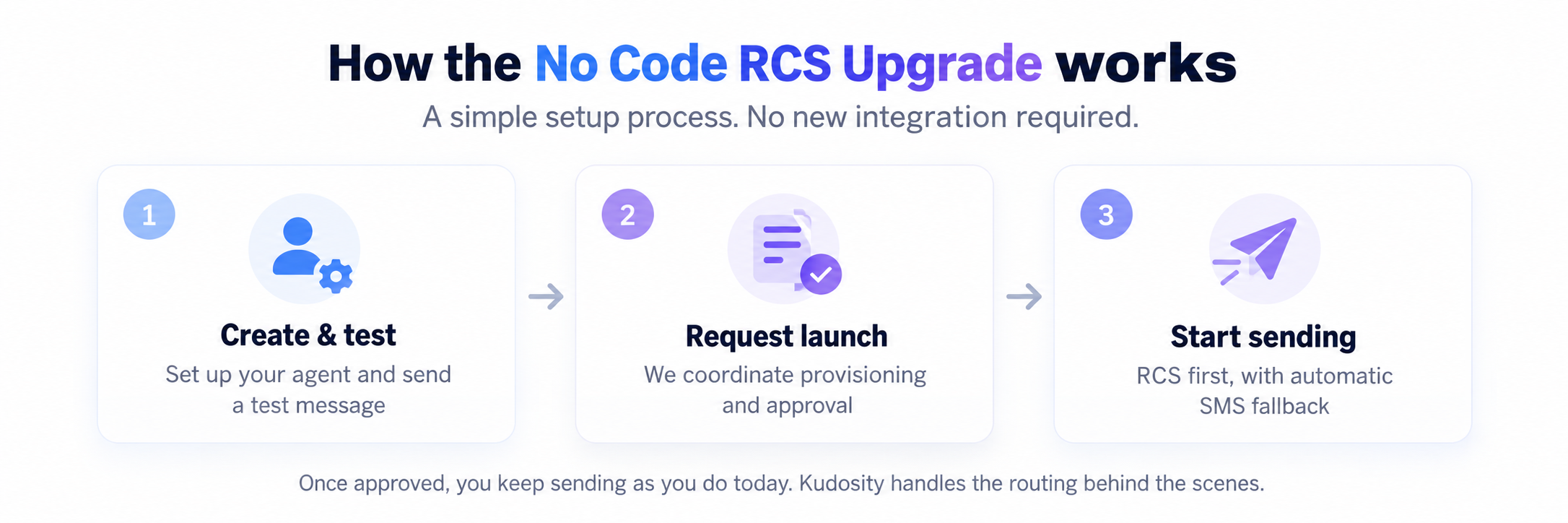
Create and test your RCS agent in Kudosity, then submit it for launch. We coordinate provisioning and approval with our messaging partners and supported networks.
Once your agent is approved, we enable RCS-first delivery on your account. Eligible messages are sent through RCS, with automatic SMS fallback when RCS isn’t available.
No new messaging integration is required. Keep your existing workflows while Kudosity handles RCS-first routing and SMS fallback behind the scenes.
Start with the upgrade. Build more when the value is clear.
For existing Kudosity customers, we recommend starting with the No Code RCS Upgrade.
It lets you introduce RCS using the messages and workflows you already have, without committing to a new integration before you know what RCS can do for your business.
Start with a familiar use case, such as reminders, notifications or an existing campaign. See where RCS improves the customer experience and where it delivers value.
Then, when there’s a reason to go further, you can build a direct RCS integration to unlock richer experiences such as cards, carousels and interactive buttons.
A full integration is an option, not a prerequisite.
You’ve already built the way your business sends messages. The No Code RCS Upgrade lets you build on that investment.
:quality(80))
:quality(80))
:quality(80))
:quality(80))
:quality(80))
:quality(80))