:quality(80))
SMS Alerts and Notifications for Customer Messaging
SMS alerts and notifications help businesses keep customers informed at the moments that matter.
They are short, direct messages triggered by a customer action, business event or system update. That might be an appointment reminder, order confirmation, delivery alert, payment reminder, security code or customer service update.
For teams comparing the best SMS API providers for customer notifications, the question is not only whether the platform can send messages. It is whether it can support the full workflow: trigger the message, track delivery, handle replies, manage failures and update the systems your team already uses.
What are SMS alerts and notifications?
SMS alerts and notifications are text messages sent by a business to share important information with a customer.
They are usually transactional, operational or time-sensitive. Unlike a broad marketing campaign, an SMS notification is normally connected to something specific that has happened or needs attention.
For example, a customer books an appointment and receives a reminder. An order leaves the warehouse and triggers a delivery update. A login attempt prompts a security code. A support case is updated and the customer receives a status message.
The value is in timing. A good SMS notification should reach the customer when the information is useful, not hours after the moment has passed.
Common SMS notification use cases
SMS alerts and notifications are used across most customer-facing industries because they are simple, fast and easy to act on.
Common use cases include:
Appointment reminders: Reduce no-shows and give customers a simple way to confirm or reschedule.
Order confirmations: Let customers know their purchase or booking has been received.
Delivery alerts: Share dispatch updates, tracking details or delivery changes.
Payment reminders: Prompt customers before or after a due date, with a clear next step.
System alerts: Notify users when a service, account or platform event needs attention.
Security codes: Send one-time passcodes or verification messages for account access.
Customer service updates: Keep customers informed when a case, request or enquiry changes status.
These messages work best when they are specific. “Your order has shipped” is useful. “We have an update for you” is usually less helpful unless the next action is clear.
Why use an SMS API for notifications?
An SMS API lets your business systems send messages automatically.
Instead of a team member manually writing and sending every alert, the SMS API connects messaging to the platforms where customer events already happen. That might be a CRM, booking system, ecommerce platform, payment tool, support desk or internal application.
An SMS API is useful for notifications because it supports:
Automated triggers: Messages can be sent when a customer books, pays, orders, replies or updates details.
Reliable delivery: Notifications can be routed through messaging infrastructure built for high-volume sending.
Message tracking: Delivery reports show whether a message was sent, delivered, failed or still pending.
Reply handling: Customers can confirm, ask a question or request help when two-way SMS is enabled.
Easy integration: Webhooks and APIs can connect SMS activity back into business systems.
For customer messaging, this matters because notifications rarely stand alone. They are part of a workflow. If the customer replies, the support team needs to see it. If a message fails, the system may need to retry or use another channel. If a reminder drives a booking confirmation, that status should update automatically.
SMS notification workflow
A practical SMS notification workflow usually looks like this:

Customer event
SMS API
Message sent
Delivery report
Customer reply
Workflow update
1. Customer event
The workflow starts when something happens. A customer books an appointment, places an order, misses a payment, requests a password reset or updates a support ticket.
2. SMS API
The connected business system sends a request to the SMS API. That request includes the recipient, message content, sender details and any required workflow information.
3. Message sent
The SMS platform sends the message through the appropriate delivery route. For time-sensitive alerts, speed and routing quality matter.
4. Delivery report
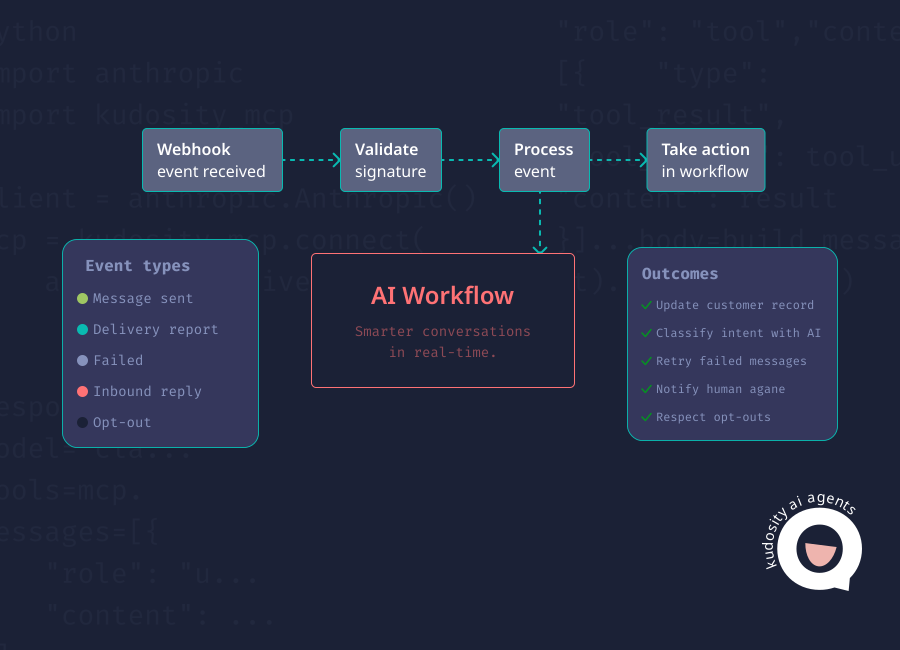
The platform returns a delivery report so the business can see whether the message was delivered, failed or is still pending.
5. Customer reply
If two-way SMS is enabled, the customer can respond. That reply might confirm an appointment, ask a delivery question, request a call back or opt out.
6. Workflow update
The reply or delivery status is passed back into the CRM, support desk, booking system or internal workflow. This is what turns SMS from a send-only channel into part of the customer messaging operation.
Metrics to track
SMS notification performance should be measured beyond send volume. The most useful metrics show whether the message reached the customer and whether it helped move the workflow forward.
| Metric | What it tells you | Why it matters |
|---|---|---|
| Sent | The number of messages submitted through the platform. | Helps teams understand total message activity and cost. |
| Delivered | The number of messages confirmed as delivered where delivery reporting is available. | Shows whether messages are reaching customers. |
| Failed | Messages that could not be delivered. | Helps identify invalid numbers, carrier issues or workflow problems. |
| Replies | Customer responses to two-way SMS notifications. | Shows engagement and helps support teams act on customer intent. |
| Opt-outs | Customers who unsubscribe or request not to receive further messages. | Supports compliance and helps protect customer trust. |
| Conversion | The action taken after the notification, such as confirming, paying, booking or reviewing. | Connects SMS activity to business outcomes. |
Tracking these metrics helps teams improve message timing, wording, routing, audience quality and follow-up processes.
Where Kudosity fits
Kudosity helps businesses send SMS alerts and notifications through messaging infrastructure built for customer workflows.
That includes SMS API access, delivery reporting, two-way replies, webhooks and automation support. For Australian businesses, Kudosity also provides local support and compliance guidance, including sender ID and ACMA-aligned messaging considerations.
This makes Kudosity a strong fit when SMS notifications are tied to customer service, bookings, ecommerce, payments, security or AI-assisted follow-up workflows.
FAQs
SMS notifications are text messages sent by a business to update customers about a specific event, action or status change. Common examples include appointment reminders, delivery updates, payment reminders, order confirmations and security codes.
SMS alerts usually work through a connected system and an SMS API. When a customer event occurs, the system triggers the API to send a message. The SMS platform then sends the alert and returns delivery information where available.
Yes. SMS alerts can be automated through APIs, webhooks and workflow rules. For example, a booking system can send appointment reminders, an ecommerce platform can send order updates, or a support desk can send case status notifications.
Yes, if the business uses two-way SMS. Customer replies can be routed into a dashboard, CRM, support platform or internal workflow so teams can respond or trigger the next action.
Businesses track delivery through delivery reports, webhooks, status updates and error codes from the SMS provider. These signals help teams see whether messages were delivered, failed or need follow-up.
Join our Rich Messaging beta testing
Rich messaging combines the simplicity of SMS with the dynamic interactivity of app-like experiences, transforming how brands engage with their audience. With channels like Rich Communication Services (RCS) and WhatsApp.
Transform your customer engagement with richer media, interactivity, and branded experiences.